
 ChatGPT
  Claude
  Geminiを開く
 4-Sensorsリーフに搭載された温湿度センサの値を読み取って、シリアルモニタに表示するサンプルです。
使用するリーフ
Section titled “使用するリーフ”以下のリーフを使用します
| Type | Name | Q’ty |
|---|---|---|
| AZ62 | Connector Cover | 1 |
| AI01 | 4-Sensors | 1 |
| AZ01 | USB | 1 |
| AP03 | STM32 MCU | 1 |
| AV01 | CR2032 | 1 |
| CR2032 coin cell battery | 1 | |
| M2*15mm screw | 2 |
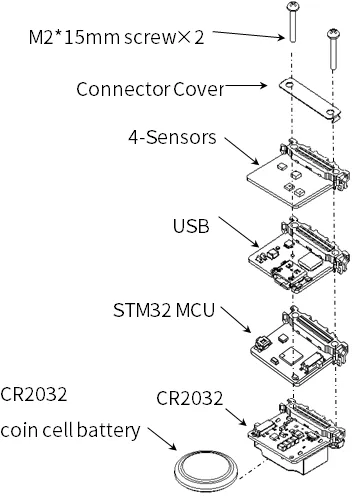
リーフの組み立て
Section titled “リーフの組み立て”下図を参考にリーフを組み立ててみましょう。
ソースコード
Section titled “ソースコード”Arduino IDEで下記のプログラム1を書きましょう。
このスケッチを動かすためには、ライブラリのインストールが必要です。 まだインストールしていない場合は開発環境設定ページを参考にライブラリをインストールしてください。
//=====================================================================//  Thermo-Hygrometer////    (c) 2021 LEAFONY SYSTEMS Co., Ltd//    Released under the MIT license//    https://opensource.org/licenses/MIT////      Rev.00 2021/04/01  First release//=====================================================================#include <Wire.h>#include <HTS221.h>
//---------------------------// Data for two-point correction//---------------------------// Temperature correction data 0float TL0 = 25.0;     // 4-Sensors Temperature measurement valuefloat TM0 = 25.0;     // Thermometer and other measurements value// Temperature correction data 1float TL1 = 40.0;     // 4-Sensors Temperature measurement valuefloat TM1 = 40.0;     // Thermometer and other measurements value
// Humidity correction data 0float HL0 = 60.0;     // 4-Sensors Humidity measurement valuefloat HM0 = 60.0;     // Hygrometer and other measurements value// Humidity correction data 1float HL1 = 80.0;     // 4-Sensors Humidity measurement valuefloat HM1 = 80.0;     // Hygrometer and other measurements value
void setup() {  // initialize serial communication at 115200 second per second:  Serial.begin(115200);  Wire.begin();             // I2C 100kHz  // initialize i2c communication with HTS221:  smeHumidity.begin();  delay(10);}
void loop() {  // read temperature and humidity:  float dataTemp = (float)smeHumidity.readTemperature();  float dataHumid = (float)smeHumidity.readHumidity();
  // calibration:  dataTemp = TM0 + (TM1 - TM0) * (dataTemp - TL0) / (TL1 - TL0);      // Temperature correction  dataHumid = HM0 + (HM1 - HM0) * (dataHumid - HL0) / (HL1 - HL0);    // Humidity correction
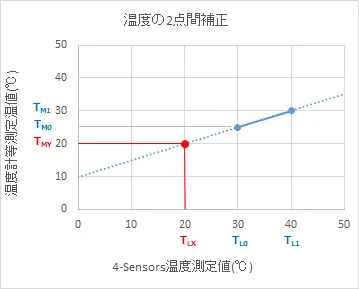
Serial.println(String(dataTemp) + "[℃], " + String(dataHumid) + "[%]"); delay(1000);}表示させたい温度(または、湿度)と4-Sensorsの温度(または、湿度)に、ずれがあるときは、2点間補正を行います。以下は、温度を例に、補正方法を記します。
まず、4-Sensorsと、基準となる計測器で、2点の温度を測定してください。次に、測定した値を、サンプルスケッチに書き込んで、実行していただければ、4-Sensorsの温度が、表示させたい温度に近づきます。

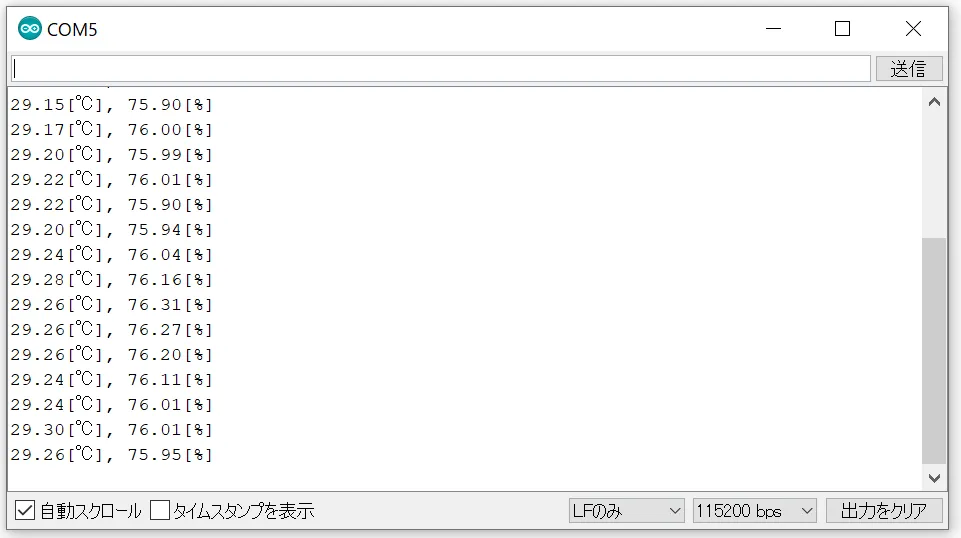
Arduino IDEのシリアルモニタを開き、ボーレートを115200bpsとすると、温度と湿度が表示されます。
Footnotes
Section titled “Footnotes”-
プログラムは、AVR MCUリーフと同じです。 ↩