 ChatGPT
  Claude
  Geminiを開く
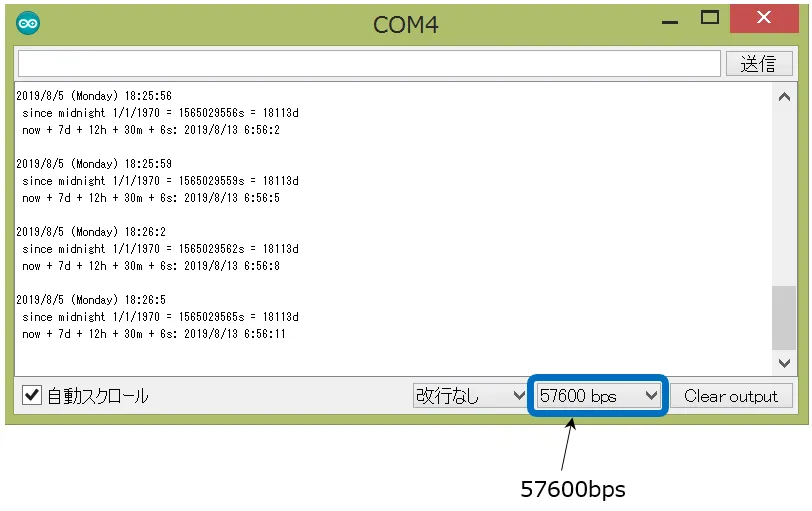
 時刻がパソコンのシリアルモニタに表示されます。
使用するリーフ
Section titled “使用するリーフ”| Type | Name | Q’ty |
|---|---|---|
| AZ62 | Connector Cover | 1 |
| AP02 | ESP32 MCU | 1 |
| AZ02 | RTCµSD | 1 |
| AZ63 | Nut Plate | 1 |
| M2*15mm screw | 2 |
リーフの組立
Section titled “リーフの組立”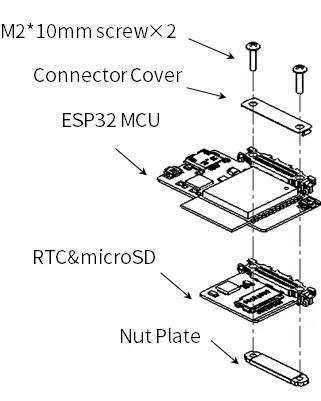
ソースコード
Section titled “ソースコード”Arduino IDEで下記のプログラムを書きましょう。
このスケッチを動かすためには、ライブラリのインストールが必要です。 まだインストールしていない場合は開発環境設定ページを参考にライブラリをインストールしてください。
-
Arduino IDEで、「ファイル」→「スケッチ例」→「RTClib」→「pcf8523」で、マイコンボードに書き込んでください。
-
低消費電力設定のため、87行を追加してください。
// Date and time functions using a PCF8523 RTC connected via I2C and Wire lib#include "RTClib.h"
RTC_PCF8523 rtc;
char daysOfTheWeek[7][12] = {"Sunday", "Monday", "Tuesday", "Wednesday", "Thursday", "Friday", "Saturday"};
void setup () {  Serial.begin(115200);
#ifndef ESP8266  while (!Serial); // wait for serial port to connect. Needed for native USB#endif
  if (! rtc.begin()) {    Serial.println("Couldn't find RTC");    Serial.flush();    abort();  }
  if (! rtc.initialized() || rtc.lostPower()) {    Serial.println("RTC is NOT initialized, let's set the time!");    // When time needs to be set on a new device, or after a power loss, the    // following line sets the RTC to the date & time this sketch was compiled    rtc.adjust(DateTime(F(__DATE__), F(__TIME__)));    // This line sets the RTC with an explicit date & time, for example to set    // January 21, 2014 at 3am you would call:    // rtc.adjust(DateTime(2014, 1, 21, 3, 0, 0));    //    // Note: allow 2 seconds after inserting battery or applying external power    // without battery before calling adjust(). This gives the PCF8523's    // crystal oscillator time to stabilize. If you call adjust() very quickly    // after the RTC is powered, lostPower() may still return true.  }
  // When time needs to be re-set on a previously configured device, the  // following line sets the RTC to the date & time this sketch was compiled  // rtc.adjust(DateTime(F(__DATE__), F(__TIME__)));  // This line sets the RTC with an explicit date & time, for example to set  // January 21, 2014 at 3am you would call:  // rtc.adjust(DateTime(2014, 1, 21, 3, 0, 0));
  // When the RTC was stopped and stays connected to the battery, it has  // to be restarted by clearing the STOP bit. Let's do this to ensure  // the RTC is running.  rtc.start();  rtc.writeSqwPinMode(PCF8523_OFF);                       // Low consumption of electricity
}
void loop () {    DateTime now = rtc.now();
    Serial.print(now.year(), DEC);    Serial.print('/');    Serial.print(now.month(), DEC);    Serial.print('/');    Serial.print(now.day(), DEC);    Serial.print(" (");    Serial.print(daysOfTheWeek[now.dayOfTheWeek()]);    Serial.print(") ");    Serial.print(now.hour(), DEC);    Serial.print(':');    Serial.print(now.minute(), DEC);    Serial.print(':');    Serial.print(now.second(), DEC);    Serial.println();
    Serial.print(" since midnight 1/1/1970 = ");    Serial.print(now.unixtime());    Serial.print("s = ");    Serial.print(now.unixtime() / 86400L);    Serial.println("d");
    // calculate a date which is 7 days, 12 hours and 30 seconds into the future    DateTime future (now + TimeSpan(7,12,30,6));
    Serial.print(" now + 7d + 12h + 30m + 6s: ");    Serial.print(future.year(), DEC);    Serial.print('/');    Serial.print(future.month(), DEC);    Serial.print('/');    Serial.print(future.day(), DEC);    Serial.print(' ');    Serial.print(future.hour(), DEC);    Serial.print(':');    Serial.print(future.minute(), DEC);    Serial.print(':');    Serial.print(future.second(), DEC);    Serial.println();
Serial.println(); delay(3000);}コンパイルした時間が書き込まれます。 電源がなくなる等でRTCが初期化されると、コンパイルした時間に初期化されます。
シリアルモニタを起動すると、時刻が表示されます。