
 ChatGPT
  Claude
  Geminiを開く
 LCD(液晶ディスプレイ)リーフを使用すると、文字列を簡単に画面に表示することができます。
また、ボタンスイッチが2個搭載されていて、コントローラとして使うこともできます。
表示は1行8文字、2行です。Hello, World!は13文字なので1行には収まりません。下記のサンプルは、表示範囲に収まる Hello!を使っています。
AZ01C(USB Type-C)を使う場合は、AZ01Cの書き込み手順で書き込み時の手動リセットも確認してください。AI04は生産終了品ですが、お手元のリーフの仕様書と回路図はAI04の技術資料から参照できます。
使用するリーフ
Section titled “使用するリーフ”| Type | Name | Q’ty |
|---|---|---|
| AZ62 | Connector Cover | 1 |
| AI04 | LCD | 1 |
| AP01 | AVR MCU | 1 |
| AZ01 | USB | 1 |
| AV01 | CR2032 | 1 |
| CR2032 coin cell battery | 1 | |
| M2*15mm screw | 2 |
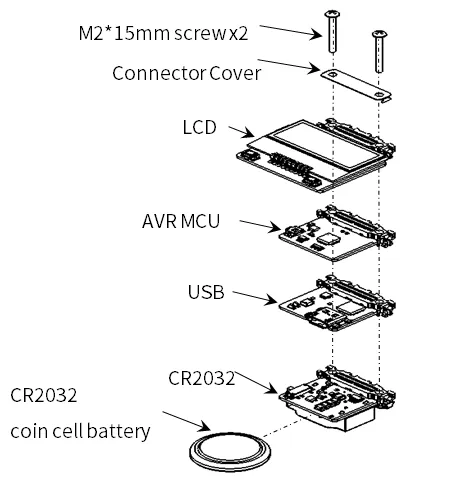
リーフの組み立て
Section titled “リーフの組み立て”下図のようにリーフを組み立てましょう。
実行前に確認すること
Section titled “実行前に確認すること”このサンプルは、tomozh氏のarduino_ST7032(ST7032.h)を使用します。GitHubのCode → Download ZIPから取得し、Arduino IDEのスケッチ → ライブラリをインクルード → ZIP形式のライブラリをインストールで導入してください。詳しい導入手順も参照できます。LCD_ST7032やST7032_asukiaaaは別の実装です。
AI04では、LCDコントローラ(0x3E)とは別に、I2C I/O Expander(このサンプルでは0x1A)がLCDへの給電を制御します。setup()先頭の次の処理を含めて、スケッチ全体を使用してください。
Wire.begin()でI2Cを開始します。- エキスパンダのレジスタ
0x03に0xFEを書き、P0を出力にします。 - レジスタ
0x01に0x01を書き、LCDへの給電を有効にします。 lcd.begin(8, 2)で表示形式を設定し、lcd.setContrast(30)でコントラストを設定します。
エキスパンダのアドレスには0x1Eの構成もあります。AI04の給電・初期化の説明を参照してください。
ソースコード
Section titled “ソースコード”Arduino IDEで下記のプログラムを書きましょう。
//=====================================================================//  Leafony Platform sample sketch//     Application  : LCD SW test//     Processor    : ATmega328P (3.3V /8MHz)////     Leaf configuration//       (1) AI04 LCD//       (2) AP01 AVR MCU//       (3) AZ01 USB////    (c) 2021 LEAFONY SYSTEMS Co., Ltd//    Released under the MIT license//    https://opensource.org/licenses/MIT////      Rev.00 2021/04/01  First release//=====================================================================// use libraries//  ST7032 - Arduino LiquidCrystal compatible library//    https://github.com/tomozh/arduino_ST7032//=====================================================================
//---------------------------------------------------------------------// difinition//---------------------------------------------------------------------#include <Wire.h>                   // I2C#include <ST7032.h>                 // LCD
//-----------------------------------------------// IO pin name definition// Define it according to the leaf to be connected.//-----------------------------------------------#define SW1         2                   // PD2  (INT0)
//-----------------------------------------------// Define constants to be used in the program//-----------------------------------------------#define I2C_EXPANDER_ADDR   0x1A
//---------------------------------------------------------------------// object//---------------------------------------------------------------------//------------------------------// LCD//------------------------------ST7032 lcd;
//====================================================================// setup//====================================================================void setup(){  pinMode(SW1, INPUT);                                //LCD SW1  Wire.begin();
  // IO Expander Initialize  i2c_write_byte(I2C_EXPANDER_ADDR, 0x03, 0xFE);  i2c_write_byte(I2C_EXPANDER_ADDR, 0x01, 0x01);      // LCD Power on
  //LCD Initialize  lcd.begin(8, 2);                                    // 8 characters, 2 lines  lcd.setContrast(30);  lcd.clear();
  lcd.print(" Hello!");  lcd.setCursor(0, 1);  delay(3000);
  i2c_write_byte(I2C_EXPANDER_ADDR, 0x01, 0x00);      // LCD Power off  delay(3000);
  i2c_write_byte(I2C_EXPANDER_ADDR, 0x01, 0x01);      // LCD Power on
  // LCD Initialize  lcd.begin(8, 2);                                    // 8 characters, 2 lines  lcd.setContrast(30);  lcd.clear();
  lcd.print("12345678");  lcd.setCursor(0, 1);  lcd.print("87654321");  delay(3000);
  lcd.clear();
  lcd.blink();  int i;  for (i=0 ; i<8 ;i++){     lcd.setCursor(i, 0);      delay(1000);  }  for (i=0 ; i<8 ;i++){     lcd.setCursor(i, 1);      delay(1000);  }  lcd.noBlink();}
//====================================================================// Main loop//====================================================================void loop(){  char val;
  // SW 1  val = digitalRead(SW1);  lcd.setCursor(0, 0);  if (val == 1) {     lcd.print("SW1 is H");  }else{     lcd.print("SW1 is L");  }
  // SW 2  val = i2c_read_byte(I2C_EXPANDER_ADDR, 0x00);  lcd.setCursor(0, 1);  if ((val & 0x02) == 0x02)  {     lcd.print("SW2 is H");  }  else {    lcd.print("SW2 is L");  }  delay(1000);}
//=====================================================================// I2C control function//=====================================================================//-----------------------------------------------//I2C Write 1 byte to the slave device//-----------------------------------------------void i2c_write_byte(int device_address, int reg_address, int write_data){  Wire.beginTransmission(device_address);  Wire.write(reg_address);  Wire.write(write_data);  Wire.endTransmission();}
//-----------------------------------------------//I2C Read 1 byte from the slave device//-----------------------------------------------unsigned char i2c_read_byte(int device_address, int reg_address){
  int read_data = 0;
  Wire.beginTransmission(device_address);  Wire.write(reg_address);  Wire.endTransmission(false);
  Wire.requestFrom(device_address, 1);  read_data = Wire.read();
return read_data;}LCDに下記の順で画面が表示されます。
Hello!を3秒間表示- LCD電源を3秒間オフ(この間、表示は消えます)
- 1行目に
12345678、2行目に87654321を3秒間表示 - カーソルが移動
- ボタンの入力状態を表示
表示が出ない場合は、AI04の確認手順を参照してください。I2Cスキャンや送信成功だけでは、表示に必要な電源・初期化・コントラストの確認は完了しません。