
STM32: Read the temperature and humidity sensor
Explore with your favorite AI
 ChatGPT
  Claude
 Gemini & other AI
Copy this page’s context into your AI to explore how it works and what you can build.
 Open Gemini
 Copy the prompt, then paste it into Gemini’s message box.
View prompt
Overview
Section titled “Overview”This sample reads the value of the temperature and humidity sensor on the 4-Sensors Leaf and displays it on a serial monitor.
Leaf to use
Section titled “Leaf to use”Use the following leaves.
| Type | Name | Q’ty |
|---|---|---|
| AZ62 | Connector Cover | 1 |
| AI01 | 4-Sensors | 1 |
| AZ01 | USB | 1 |
| AP03 | STM32 MCU | 1 |
| AV01 | CR2032 | 1 |
| CR2032 coin cell battery | 1 | |
| M2*15mm screw | 2 |
Assembly
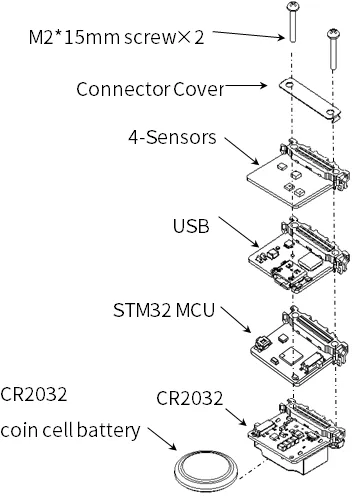
Section titled “Assembly”Let’s assemble leaves as shown in the figure below.
Source code
Section titled “Source code”Write the following program1 in the Arduino IDE.
In order to make this sketch work, you need to install the libraries If you haven’t installed it yet, refer to Environment to install it.
//=====================================================================//  Thermo-Hygrometer////    (c) 2021 Trillion-Node Study Group//    Released under the MIT license//    https://opensource.org/licenses/MIT////      Rev.00 2020/05/05  First release//=====================================================================#include <Wire.h>#include <HTS221.h>
//---------------------------// Data for two-point correction//---------------------------// Temperature correction data 0float TL0 = 25.0;     // 4-Sensors Temperature measurement valuefloat TM0 = 25.0;     // Thermometer and other measurements value// Temperature correction data 1float TL1 = 40.0;     // 4-Sensors Temperature measurement valuefloat TM1 = 40.0;     // Thermometer and other measurements value
// Humidity correction data 0float HL0 = 60.0;     // 4-Sensors Humidity measurement valuefloat HM0 = 60.0;     // Hygrometer and other measurements value// Humidity correction data 1float HL1 = 80.0;     // 4-Sensors Humidity measurement valuefloat HM1 = 80.0;     // Hygrometer and other measurements value
void setup() {  // initialize serial communication at 115200 second per second:  Serial.begin(115200);  Wire.begin();             // I2C 100kHz  // initialize i2c communication with HTS221:  smeHumidity.begin();  delay(10);}
void loop() {  // read temperature and humidity:  float dataTemp = (float)smeHumidity.readTemperature();  float dataHumid = (float)smeHumidity.readHumidity();
  // calibration:  dataTemp = TM0 + (TM1 - TM0) * (dataTemp - TL0) / (TL1 - TL0);      // Temperature correction  dataHumid = HM0 + (HM1 - HM0) * (dataHumid - HL0) / (HL1 - HL0);    // Humidity correction
Serial.println(String(dataTemp) + "[℃], " + String(dataHumid) + "[%]"); delay(1000);}2 point-to-point correction
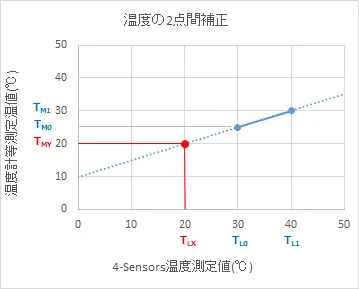
Section titled “2 point-to-point correction”If there is a discrepancy between the temperature (or humidity) that you want to display and the temperature (or humidity) of the 4-Sensors, perform the correction between the two points. The following is a description of the correction method using temperature as an example.
First, measure the temperatures of the two points with the 4-Sensors and a reference instrument. Then, write the measured values in the sample sketch and run it, and the temperature of the 4-Sensors will be close to the temperature you want to display.

Execution Results
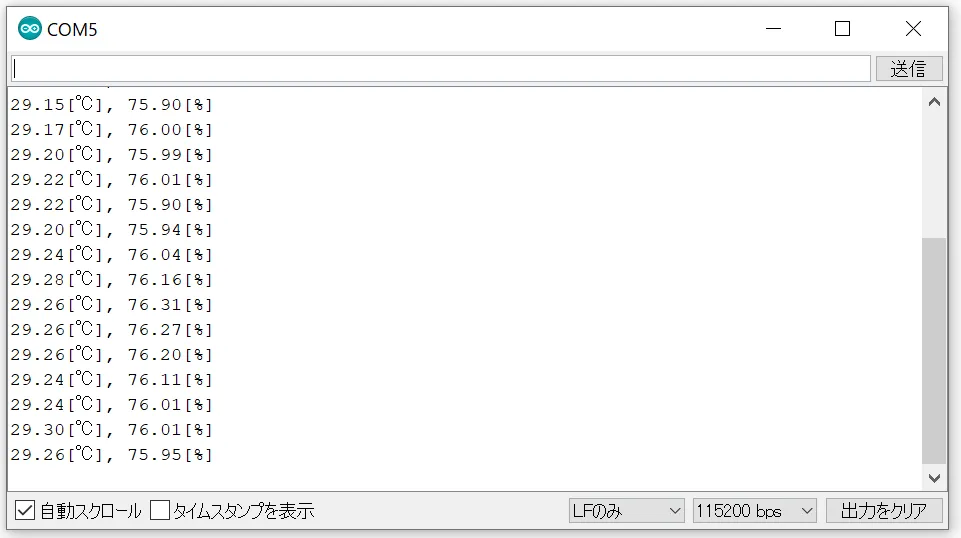
Section titled “Execution Results”Open the serial monitor of the Arduino IDE and set the baud rate to 115200 bps and you will see the temperature and humidity.
Footnotes
Section titled “Footnotes”-
The program is the same as AVR MCU Leaf. ↩