 ChatGPT
  Claude
  Geminiを開く
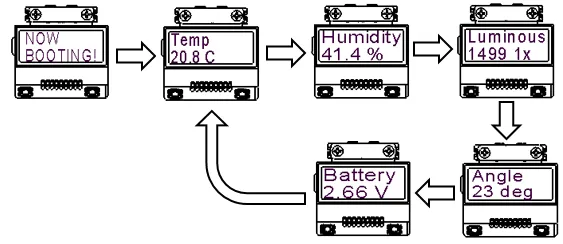
 電源リーフには、電池電圧をモニタするためのADコンバータを実装。温度、湿度、照度、傾きだけでなく、電池電圧も測定し、LCDに表示させます。
温度(または、湿度)の補正の仕方
Section titled “温度(または、湿度)の補正の仕方”表示させたい温度(または、湿度)と4-Sensorsの温度(または、湿度)に、ずれがあるときは、2点間補正を行います。詳しくは、こちら。

使用するリーフ
Section titled “使用するリーフ”| Type | Name | Q’ty |
|---|---|---|
| AI04 | LCD | 1 |
| AI01 | 4-Sensors | 1 |
| AP01 | AVR MCU | 1 |
| AZ01 | USB | 1 |
| AX03 | Leaf×2 | 1 |
| AV01 | CR2032 | 1 |
| AZ62 | Connector Cover | 2 |
| AZ63 | Nut Plate | 1 |
| CR2032 coin cell battery | 1 | |
| M2*15mm screw | 4 |
リーフの組立
Section titled “リーフの組立”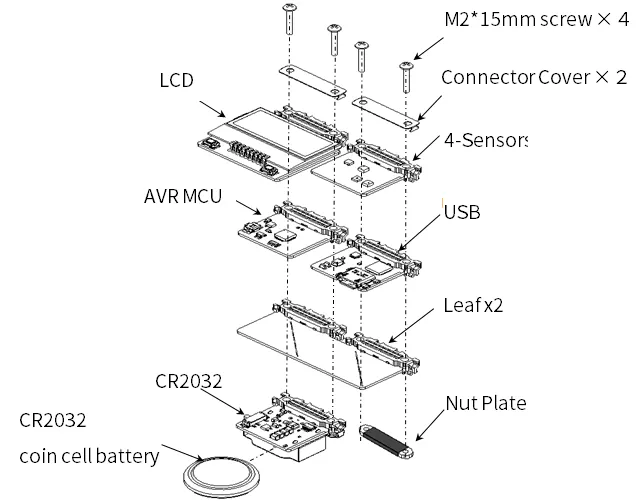
ソースコード
Section titled “ソースコード”- 書き込みには、4-Sensors、LCD、AVR MCUライブラリ(タイマ割り込み)が必要です。予め、ライブラリをインクルードしておいてください。詳しくは、こちら。
- Arduino IDEで、以下のスケッチをマイコンボードに書き込んでください。
//=====================================================================//  Leafony Platform sample sketch//     Application  : 4-Sensors with LCD//     Processor    : ATmega328P (3.3V /8MHz)//     Arduino IDE  : 1.8.13////     Leaf configuration//       (1) AI01 4-Sensors//       (2) AI04 LCD//       (3) AP01 AVR MCU//       (4) AZ01 USB////    (c)2021 LEAFONY SYSTEMS Co., Ltd//    Released under the MIT license//    https://opensource.org/licenses/MIT////    Rev.00 2021/04/01 First release////=====================================================================// use libraries//  Adafruit Unified Sensor Driver//    https://github.com/adafruit/Adafruit_Sensor//  Adafruit Bus IO Library//    https://github.com/adafruit/Adafruit_BusIO//  Adafruit LIS3DH//    https://github.com/adafruit/Adafruit_LIS3DH//  SmartEverything ST HTS221 Humidity Sensor//    https://github.com/ameltech/sme-hts221-library//  ClosedCube Arduino Library for ClosedCube OPT3001//    https://github.com/closedcube/ClosedCube_OPT3001_Arduino//  ST7032 - Arduino LiquidCrystal compatible library//    https://github.com/tomozh/arduino_ST7032//=====================================================================
//---------------------------------------------------------------------// difinition//---------------------------------------------------------------------#include <MsTimer2.h>                       // Timer#include <Wire.h>                           // I2C
#include <Adafruit_LIS3DH.h>                // 3-axis accelerometer#include <HTS221.h>                         // humidity and temperature sensor#include <ClosedCube_OPT3001.h>             // Ambient Light Sensor#include <ST7032.h>                         // LCD
//=====================================================================
//===============================================// シリアルモニタへの出力//      #define SERIAL_MONITOR = 出力あり//    //#define SERIAL_MONITOR = 出力なし(コメントアウトする)//===============================================#define SERIAL_MONITOR
//-----------------------------------------------// IOピン一覧//-----------------------------------------------//  D0              0                   // PD0  (RXD)//  D1              1                   // PD1  (TXD)//  D2              2                   // PD2  (INT0)//  D3              3                   // PD3  (INT1)//  D4              4                   // PD4//  D5              5                   // PD5//  D6              6                   // PD6//  D7              7                   // PD7//  D8              8                   // PB0  (S-UART2_RX)//  D9              9                   // PB1  (S-UART2_TX)//  D10             10                  // PB2  (SS)//  D11             11                  // PB3  (MOSI)//  D12             12                  // PB4  (MISO)//  D13             13                  // PB5  (SCK/LED)
//  D14             14                  // [A0] PC0//  D15             15                  // [A1] PC1//  D16             16                  // [A2] PC2//  D17             17                  // [A3] PC3
//-----------------------------------------------// プログラム内で使用する定数定義//-----------------------------------------------//------------------------------// I2Cアドレス//------------------------------#define LIS2DH_ADDRESS          0x19        // Accelerometer (SD0/SA0 pin = VCC)#define OPT3001_ADDRESS         0x45        // Ambient Light Sensor (ADDR pin = VCC)#define LCD_I2C_EXPANDER_ADDR   0x1A        // LCD I2C Expander#define BATT_ADC_ADDR           0x50        // Battery ADC
//-----------------------------------------------// loop interval// MsTimer2のタイマー割り込み発生間隔(ms)//-----------------------------------------------#define LOOP_INTERVAL 125                   // 125ms interval
//---------------------------------------------------------------------// object//---------------------------------------------------------------------//------------------------------// LCD//------------------------------  ST7032 lcd;
//------------------------------// Sensor//------------------------------Adafruit_LIS3DH accel = Adafruit_LIS3DH();ClosedCube_OPT3001 light;
//---------------------------------------------------------------------// プログラムで使用する変数定義//---------------------------------------------------------------------//---------------------------// LCD//---------------------------int8_t lcdSendCount = 0;
//------------------------------// Loop counter//------------------------------uint8_t iLoop1s = 0;
//------------------------------// Event//------------------------------bool event1s = false;
//------------------------------// interval Timer interrupt//------------------------------volatile bool bInterval = false;
//------------------------------// LIS2DH : Accelerometer//------------------------------float dataX_g, dataY_g, dataZ_g;float dataTilt;
//------------------------------// HTS221 : Humidity and Temperature sensor//------------------------------float dataTemp;float dataHumid;
//--------------------// 2点補正用データ//--------------------// 温度補正用データ0float TL0 = 25.0;     // 4-Sensors温度測定値float TM0 = 25.0;     // 温度計等測定値// 温度補正用データ1float TL1 = 40.0;     // 4-Sensors温度測定値float TM1 = 40.0;     // 温度計等測定値
// 湿度補正用データ0float HL0 = 60.0;     // 4-Sensors湿度測定値float HM0 = 60.0;     // 湿度計等測定値// 湿度補正用データ1float HL1 = 80.0;     // 4-Sensors湿度測定値float HM1 = 80.0;     // 湿度計等測定値
//------------------------------// OPT3001 : Ambient Light Sensor//------------------------------float dataLight;
//---------------------------// Battery//---------------------------float dataBatt = 0;
//=====================================================================// setup//=====================================================================void setup(){  Wire.begin();                 // I2C 100kHz#ifdef SERIAL_MONITOR    Serial.begin(115200);       // UART 115200bps    Serial.println("=========================================");    Serial.println("setup start");#endif
  i2c_write_byte(LCD_I2C_EXPANDER_ADDR, 0x03, 0xFE);  i2c_write_byte(LCD_I2C_EXPANDER_ADDR, 0x01, 0x01);      // LCD 電源ON  // LCD設定  lcd.begin(8, 2);  lcd.setContrast(30);  lcd.clear();
  lcd.print("NOW");  lcd.setCursor(0, 1);  lcd.print("BOOTING!");
  setupPort();  delay(10);
  noInterrupts();  setupTCInt();  interrupts();
  setupSensor();  MsTimer2::start();      // Timer inverval start
#ifdef SERIAL_MONITOR    Serial.println("");    Serial.println("=========================================");    Serial.println("loop start");    Serial.println("");#endif}
//-----------------------------------------------// IOピンの入出力設定// 接続するリーフに合わせて設定する//-----------------------------------------------void setupPort(){}
//---------------------------------------------------------------------// 各デバイスの初期設定//---------------------------------------------------------------------//------------------------------// Sensor//------------------------------void setupSensor(){  //-------------------------------------  // LIS2DH (accelerometer)  //-------------------------------------  accel.begin(LIS2DH_ADDRESS);
  accel.setClick(0, 0);                             // Disable Interrupt  accel.setRange(LIS3DH_RANGE_2_G);                 // Full scale +/- 2G  accel.setDataRate(LIS3DH_DATARATE_10_HZ);         // Data rate = 10Hz
  //-------------------------------------  // HTS221 (Humidity and Temperature sensor)  //-------------------------------------  smeHumidity.begin();
  //-------------------------------------  // OPT3001 (Ambient Light Sensor)  //-------------------------------------  OPT3001_Config newConfig;  OPT3001_ErrorCode errorConfig;
  light.begin(OPT3001_ADDRESS);                 // I2C address
  newConfig.RangeNumber = B1100;                // automatic full scale  newConfig.ConvertionTime = B1;                // convertion time = 800ms  newConfig.ModeOfConversionOperation = B11;    // continous conversion  newConfig.Latch = B0;                         // hysteresis-style
  errorConfig = light.writeConfig(newConfig);
  if(errorConfig != NO_ERROR){    errorConfig = light.writeConfig(newConfig);   //retry  }}
//=====================================================================// 割り込み処理//=====================================================================//-----------------------------------------------// 割り込み処理初期設定// Timer interrupt (interval=125ms, int=overflow)// メインループのタイマー割り込み設定//-----------------------------------------------void setupTCInt(){  MsTimer2::set(LOOP_INTERVAL, intTimer);}
//----------------------------------------------// Timer INT// タイマー割り込み関数//----------------------------------------------void intTimer(){  bInterval = true;}
//====================================================================// loop//====================================================================//---------------------------------------------------------------------// Main loop//---------------------------------------------------------------------void loop(){  //-----------------------------------------------------  // Timer interval 125ms で1回ループ  //-----------------------------------------------------  if (bInterval == true){     bInterval = false;    //--------------------------------------------    loopCounter();                    // loop counter    //--------------------------------------------    // 1sに1回実行する    //--------------------------------------------    if (event1s == true){      event1s = false;                  // initialize parameter      loopSensor();                     // sensor read      dispSencerData();                 // LCD    }  }}
//---------------------------------------------------------------------// Counter// メインループのループ回数をカウントし// 1秒間隔でセンサーデータの取得をONにする//---------------------------------------------------------------------void loopCounter(){  iLoop1s += 1;  //--------------------  // 1s period  //--------------------  if (iLoop1s >=  8){             // 125ms x 8 = 1s    iLoop1s = 0;    event1s = true;  }}
//---------------------------------------------------------------------// Sensor// センサーデータ取得がONのとき、各センサーからデータを取得// コンソール出力がONのときシリアルに測定値と計算結果を出力する//---------------------------------------------------------------------void loopSensor(){  double temp_mv;    //-------------------------    // LIS2DH    // 3軸センサーのデータ取得    //-------------------------    accel.read();    dataX_g = accel.x_g;    //X軸    dataY_g = accel.y_g;    //Y軸    dataZ_g = accel.z_g;    //Z軸
    if(dataZ_g >= 1.0){      dataZ_g = 1.00;    } else if (dataZ_g <= -1.0){      dataZ_g = -1.00;    }
    dataTilt = acos(dataZ_g)/PI*180;
    //-------------------------    // HTS221    // 温湿度センサーデータ取得    //-------------------------    dataTemp = (float)smeHumidity.readTemperature();  //温度    dataHumid = (float)smeHumidity.readHumidity();    //湿度
    //-------------------------    // 温度と湿度の2点補正    //-------------------------    dataTemp=TM0+(TM1-TM0)*(dataTemp-TL0)/(TL1-TL0);      // 温度補正    dataHumid=HM0+(HM1-HM0)*(dataHumid-HL0)/(HL1-HL0);    // 湿度補正
    //-------------------------    // OPT3001    // 照度センサーデータ取得    //-------------------------    OPT3001 result = light.readResult();
    if(result.error == NO_ERROR){      dataLight = result.lux;    }
  //-------------------------  // ADC081C027(ADC)  // 電池リーフ電池電圧取得  //-------------------------  uint8_t adcVal1 = 0;  uint8_t adcVal2 = 0;
  Wire.beginTransmission(BATT_ADC_ADDR);  Wire.write(0x00);  Wire.endTransmission(false);  Wire.requestFrom(BATT_ADC_ADDR,2);  adcVal1 = Wire.read();  adcVal2 = Wire.read();
  if (adcVal1 == 0xff && adcVal2 == 0xff) {    //測定値がFFならバッテリリーフはつながっていない    adcVal1 = adcVal2 = 0;  }
  //電圧計算 ADC * ((リファレンス電圧(3.3V)/ ADCの分解能(256)) * 分圧比(2倍))  temp_mv = ((double)((adcVal1 << 4) | (adcVal2 >> 4)) * 3300 * 2) / 256;  dataBatt = (float)(temp_mv / 1000);
    //-------------------------    // シリアルモニタ表示    //-------------------------#ifdef SERIAL_MONITOR    Serial.println("--- sensor data ---");    Serial.println("  Tmp[degC]     = " + String(dataTemp));    Serial.println("  Hum[%]        = " + String(dataHumid));    Serial.println("  Lum[lx]       = " + String(dataLight));    Serial.println("  Ang[arc deg]  = " + String(dataTilt));    Serial.println("  Bat[V]        = " + String(dataBatt));#endif}
//---------------------------------------//  Disp sensor data// センサーデータを文字列に変換してLCDに表示する//---------------------------------------void dispSencerData(){  float value;  char temp[7], humid[7], light[7], tilt[7], battVolt[7];  char sendData[40];
  //-----------------------------------  //センサーデータを文字列に変換  //dtostrf(変換する数字,変換される文字数,小数点以下の桁数,変換した文字の格納先);  //変換される文字数を-にすると変換される文字は左詰め、+なら右詰めとなる  //-----------------------------------  //-------------------------  // Temperature (4Byte)  //-------------------------  value = dataTemp;  if(value >= 100){    value = 99.9;  }  else if(value <= -10){    value = -9.9;  }  dtostrf(value,4,1,temp);
  //-------------------------  // Humidity (4Byte)  //-------------------------  value = dataHumid;  dtostrf(value,4,1,humid);
  //-------------------------  // Ambient Light (5Byte)  //-------------------------  value = dataLight;  if(value >= 100000){    value = 99999;  }  dtostrf(value,5,0,light);
  //-------------------------  // Tilt (4Byte)  //-------------------------  value = dataTilt;  if(value < 3){    value = 0;  }  dtostrf(value,4,0,tilt);
  //-------------------------  // Battery Voltage (4Byte)  //-------------------------  value = dataBatt;  if (value >= 10){   value = 9.99;  }  dtostrf(value, 4, 2, battVolt);
  //-------------------------  trim(temp);  trim(humid);  trim(light);  trim(tilt);  trim(battVolt);
  lcd.clear();  switch (lcdSendCount){    case 0:                 // Tmp XX.X [degC]      lcd.print("Temp");      lcd.setCursor(0, 1);      lcd.print( String(temp) +" C");      break;    case 1:                 // Hum xx.x [%]      lcd.print("Humidity");      lcd.setCursor(0, 1);      lcd.print( String(humid) +" %");      break;    case 2:                 // Lum XXXXX [lx]      lcd.print("Luminous");      lcd.setCursor(0, 1);      lcd.print( String(light) +" lx");      break;    case 3:                 // Ang XXXX [arc deg]      lcd.print("Angle");      lcd.setCursor(0, 1);      lcd.print( String(tilt) +" deg");      break;    case 4:                 // Bat X.XX [V]      lcd.print("Battery");      lcd.setCursor(0, 1);      lcd.print( String(battVolt) +" V");      break;    default:      break;  }  if (lcdSendCount < 4){    lcdSendCount++;  }  else{    lcdSendCount = 0;  }}
//---------------------------------------// trim// 文字列配列からSPを削除する//---------------------------------------void trim(char * data){  int i = 0, j = 0;
  while (*(data + i) != '\0'){    if (*(data + i) != ' '){      *(data + j) = *(data + i);      j++;    }    i++;  }  *(data + j) = '\0';}
//=====================================================================// I2C 制御関数//=====================================================================//-----------------------------------------------//I2C スレーブデバイスに1バイト書き込む//-----------------------------------------------void i2c_write_byte(int device_address, int reg_address, int write_data){  Wire.beginTransmission(device_address);  Wire.write(reg_address);  Wire.write(write_data);  Wire.endTransmission();}
//-----------------------------------------------//I2C スレーブデバイスから1バイト読み込む//-----------------------------------------------unsigned char i2c_read_byte(int device_address, int reg_address){  int read_data = 0;
  Wire.beginTransmission(device_address);  Wire.write(reg_address);  Wire.endTransmission(false);
  Wire.requestFrom(device_address, 1);  read_data = Wire.read();
return read_data;}温度 → 湿度 → 照度 → 角度 → バッテリ残量の順に液晶の表示が変わります。