照度センサ読み取り
このページをAIに渡す
 ChatGPT
  Claude
  Geminiを開く
 目次
概要
4-Sensorsリーフに搭載された照度センサの値を読み取って、シリアルモニタに表示するサンプルです。
使用するリーフ
以下のリーフを使用します
| Type | Name | Q’ty |
|---|---|---|
| AZ62 | Connector Cover | 1 |
| AI01 | 4-Sensors | 1 |
| AZ01 | USB | 1 |
| AP01 | AVR MCU | 1 |
| AV01 | CR2032 | 1 |
| CR2032 coin cell battery | 1 | |
| M2*15mm screw | 2 |
リーフの組み立て
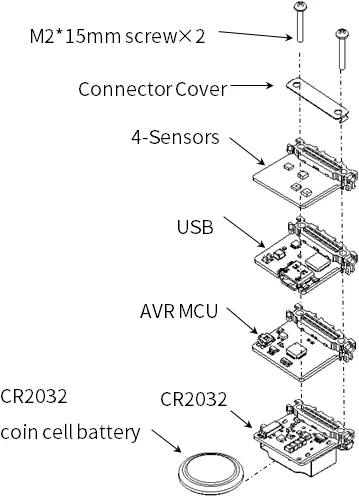
下図を参考にリーフを組み立ててみましょう。
ソースコード
Arduino IDEで下記のプログラムを書きましょう。
このスケッチを動かすためには、ライブラリのインストールが必要です。 まだインストールしていない場合は開発環境設定ページを参考にライブラリをインストールしてください。
//=====================================================================
//  Illuminance meter
//
//    (c) 2021 LEAFONY SYSTEMS Co., Ltd
//    Released under the MIT license
//    https://opensource.org/licenses/MIT
//
//      Rev.00 2021/04/01  First release
//=====================================================================
#include <Wire.h>
#include <ClosedCube_OPT3001.h>

#define OPT3001_ADDRESS 0x45      // ADDR pin = VCC

ClosedCube_OPT3001 illum;

float dataIllum;

void setup() {
  // initialize serial communication at 115200 second per second:
  Serial.begin(115200);
  // initialize i2c communication with OPT3001:
  Wire.begin();

  delay(10);

  OPT3001_Config illumConfig;
  OPT3001_ErrorCode illumErrorConfig;

  illum.begin(OPT3001_ADDRESS);

  illumConfig.RangeNumber = B1100;               // automatic full scale
  illumConfig.ConvertionTime = B1;               // convertion time = 800ms
  illumConfig.ModeOfConversionOperation = B11;   // continous conversion
  illumConfig.Latch = B0;                        // hysteresis-style

  illumErrorConfig = illum.writeConfig(illumConfig);

  if(illumErrorConfig != NO_ERROR){
    illumErrorConfig = illum.writeConfig(illumConfig);   //retry
  }
}

void loop() {
    OPT3001 result = illum.readResult();

    if(result.error == NO_ERROR){
      dataIllum = result.lux;
    }

    Serial.println("Lum[lx] = " + String(dataIllum));

    delay(1000);

}実行結果
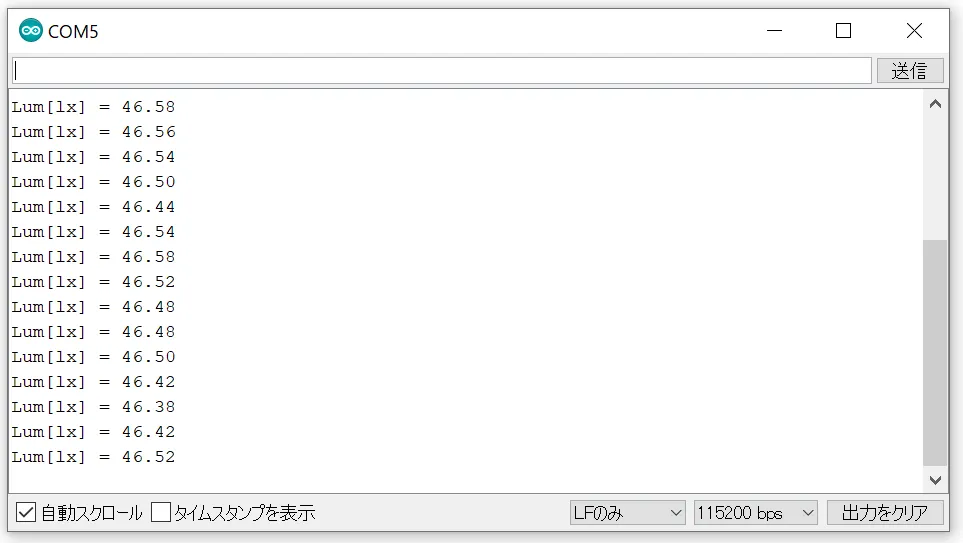
Arduino IDEのシリアルモニタを開き、ボーレートを115200bpsとすると、照度が表示されます。