
AVR: Display text on an LCD
Explore with your favorite AI
 ChatGPT
  Claude
 Gemini & other AI
Copy this page’s context into your AI to explore how it works and what you can build.
 Open Gemini
 Copy the prompt, then paste it into Gemini’s message box.
View prompt
Overview
Section titled “Overview”With an LCD (liquid crystal display) leaf, you can easily display strings on the screen.
It also comes with two button switches and can be used as a controller.
The display has 8 characters per line and 2 lines. Hello, World! has 13 characters and does not fit on one line. This sample uses Hello!, which fits within the display width.
If you use AZ01C (USB Type-C), see the AZ01C upload instructions for the manual reset required during uploading. AI04 is discontinued; the spec sheet and schematic for a leaf you already own are available from the AI04 technical page.
Leaf to use
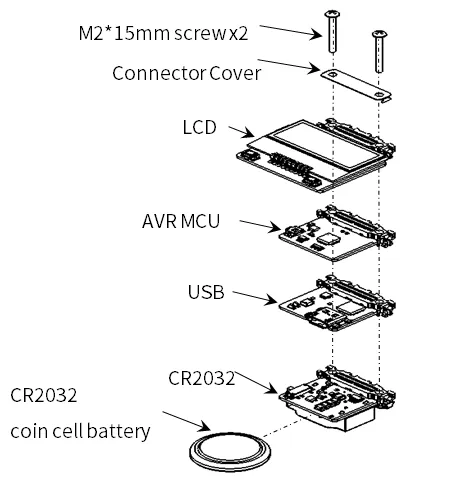
Section titled “Leaf to use”Let’s assemble leaves as shown in the figure below.
| Type | Name | Q’ty |
|---|---|---|
| AZ62 | Connector Cover | 1 |
| AI04 | LCD | 1 |
| AP01 | AVR MCU | 1 |
| AZ01 | USB | 1 |
| AV01 | CR2032 | 1 |
| CR2032 coin cell battery | 1 | |
| M2*15mm screw | 2 |
Assembly
Section titled “Assembly”Let’s assemble leaves as shown in the figure below.
Before running the sample
Section titled “Before running the sample”This sample uses arduino_ST7032 by tomozh (ST7032.h). Select Code → Download ZIP on GitHub, then install it through Sketch → Include Library → Add .ZIP Library in Arduino IDE. See the installation steps. LCD_ST7032 and ST7032_asukiaaa are different implementations.
On AI04, an I2C I/O Expander (0x1A in this sample) controls power to the LCD separately from the LCD controller (0x3E). Use the complete sketch, including these steps at the start of setup():
- Start I2C with
Wire.begin(). - Write
0xFEto the expander’s register0x03to configure P0 as an output. - Write
0x01to register0x01to enable LCD power. - Call
lcd.begin(8, 2)to set the display format andlcd.setContrast(30)to set contrast.
Some configurations use expander address 0x1E. See AI04 power and initialization.
Source code
Section titled “Source code”Write the following program in the Arduino IDE.
//=====================================================================//  Leafony Platform sample sketch//     Application  : LCD SW test//     Processor    : ATmega328P (3.3V /8MHz)////     Leaf configuration//       (1) AI04 LCD//       (2) AP01 AVR MCU//       (3) AZ01 USB////    (c) 2020  Trillion-Node Study Group//    Released under the MIT license//    https://opensource.org/licenses/MIT////      Rev.00 2019/08/01  First release//=====================================================================// use libraries//  ST7032 - Arduino LiquidCrystal compatible library//    https://github.com/tomozh/arduino_ST7032//=====================================================================
//---------------------------------------------------------------------// difinition//---------------------------------------------------------------------#include <Wire.h>                   // I2C#include <ST7032.h>                 // LCD
//-----------------------------------------------// IO pin name definition// Define it according to the leaf to be connected.//-----------------------------------------------#define SW1         2                   // PD2  (INT0)
//-----------------------------------------------// Define constants to be used in the program//-----------------------------------------------#define I2C_EXPANDER_ADDR   0x1A
//---------------------------------------------------------------------// object//---------------------------------------------------------------------//------------------------------// LCD//------------------------------ST7032 lcd;
//====================================================================// setup//====================================================================void setup(){  pinMode(SW1, INPUT);                                //LCD SW1  Wire.begin();
  // IO Expander Initialize  i2c_write_byte(I2C_EXPANDER_ADDR, 0x03, 0xFE);  i2c_write_byte(I2C_EXPANDER_ADDR, 0x01, 0x01);      // LCD Power on
  //LCD Initialize  lcd.begin(8, 2);                                    // 8 characters, 2 lines  lcd.setContrast(30);  lcd.clear();
  lcd.print(" Hello!");  lcd.setCursor(0, 1);  delay(3000);
  i2c_write_byte(I2C_EXPANDER_ADDR, 0x01, 0x00);      // LCD Power off  delay(3000);
  i2c_write_byte(I2C_EXPANDER_ADDR, 0x01, 0x01);      // LCD Power on
  // LCD Initialize  lcd.begin(8, 2);                                    // 8 characters, 2 lines  lcd.setContrast(30);  lcd.clear();
  lcd.print("12345678");  lcd.setCursor(0, 1);  lcd.print("87654321");  delay(3000);
  lcd.clear();
  lcd.blink();  int i;  for (i=0 ; i<8 ;i++){     lcd.setCursor(i, 0);      delay(1000);  }  for (i=0 ; i<8 ;i++){     lcd.setCursor(i, 1);      delay(1000);  }  lcd.noBlink();}
//====================================================================// Main loop//====================================================================void loop(){  char val;
  // SW 1  val = digitalRead(SW1);  lcd.setCursor(0, 0);  if (val == 1) {     lcd.print("SW1 is H");  }else{     lcd.print("SW1 is L");  }
  // SW 2  val = i2c_read_byte(I2C_EXPANDER_ADDR, 0x00);  lcd.setCursor(0, 1);  if ((val & 0x02) == 0x02)  {     lcd.print("SW2 is H");  }  else {    lcd.print("SW2 is L");  }  delay(1000);}
//=====================================================================// I2C control function//=====================================================================//-----------------------------------------------//I2C Write 1 byte to the slave device//-----------------------------------------------void i2c_write_byte(int device_address, int reg_address, int write_data){  Wire.beginTransmission(device_address);  Wire.write(reg_address);  Wire.write(write_data);  Wire.endTransmission();}
//-----------------------------------------------//I2C Read 1 byte from the slave device//-----------------------------------------------unsigned char i2c_read_byte(int device_address, int reg_address){
  int read_data = 0;
  Wire.beginTransmission(device_address);  Wire.write(reg_address);  Wire.endTransmission(false);
  Wire.requestFrom(device_address, 1);  read_data = Wire.read();
return read_data;}Execution Results
Section titled “Execution Results”The LCD displays the following sequence:
Hello!for 3 seconds.- LCD power off for 3 seconds; the display goes blank during this step.
12345678on the first line and87654321on the second for 3 seconds.- The cursor moves.
- The button input states are displayed.
If the display remains blank, see AI04 troubleshooting. An I2C scan or successful transmission alone does not verify that power, initialization and contrast are ready for display.