STM32 Logger Beacon
Use this page with AI
Explore with your favorite AI
 ChatGPT
  Claude
 Gemini & other AI
Copy this page’s context into your AI to explore how it works and what you can build.
 Open Gemini
 Copy the prompt, then paste it into Gemini’s message box.
View prompt
Table of contents
Introduction
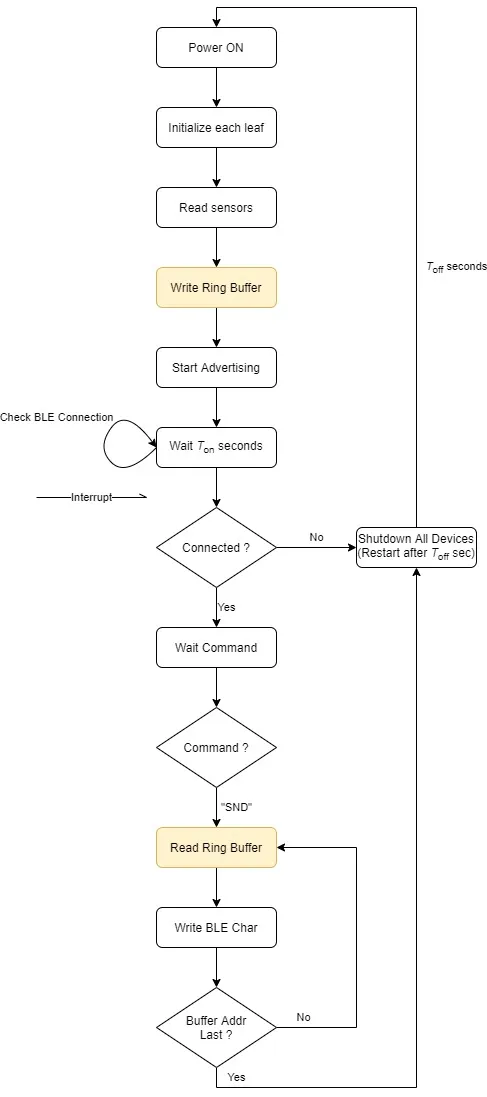
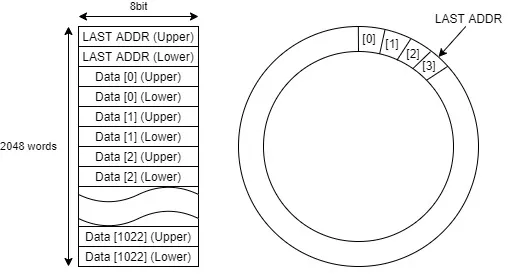
This is a sample design of a BLE Beacon that can record temperature, humidity and measurement time using the Flash memory in the STM32 leaf.
The temperature/humidity measurement method using Beacon can only provide the temperature/humidity at the current time, and in order to know the measured values up to now, it was necessary to constantly receive Beacon radio waves with a separately installed receiver.
Since Beacon’s radio wave is very weak and its transmission time is short, it is often missed during reception, which is insufficient for stable measurement.
However, in this sample, the measurement record can be kept in the non-volatile memory installed in the STM32, so even if the Beacon signal is not received, the data recorded in the non-volatile memory can be retrieved later by connecting to Leafony.
This sample also includes a web application sample that can both receive Beacon and read data written to STM32 Flash memory.
Sample source code
The source code for the sketches and tools used can be viewed in the repository below.
Sample-Sketches/STM32_Logger_Beacon at master · Leafony/Sample-Sketches
STM32 Sensors Logger Web Application
What to prepare
- Leafony
- Android smartphone
Leaf to use
| Type | Name | Q’ty |
|---|---|---|
| AI01 | 4-Sensors | 1 |
| AP03 | STM32 MCU | 1 |
| AC02 | BLE Sugar | 1 |
| AV01 | CR2032 | 1 |
| - | CR2032 coin cell battery | 1 |
| - | M2*18mm screw | 2 |
How it works
Write a sample sketch on the STM32 leaf.
- Shake Leafony to enter its connection window, select Connect, and choose Leaf_A (the initial device name). Connecting sets its clock.
- While connected, select Check interval, then Disconnect to start recording. Leave Leafony powered on for at least the measurement interval.
- Shake Leafony and connect again, then select Read stored data (Get Data). The app displays the received records as graphs and disconnects automatically when the transfer finishes.
See the STM32 demo guide for detailed steps and browser requirements. Beacon reception is optional: open Scan beacons and select Scan beacons to try it.
Operation Description