
Sound level meter
Use this page with AI
Explore with your favorite AI
 ChatGPT
  Claude
 Gemini & other AI
Copy this page’s context into your AI to explore how it works and what you can build.
 Open Gemini
 Copy the prompt, then paste it into Gemini’s message box.
View prompt
Table of contents
Overview
As you rotate the volume, the number of LEDs light up in proportion to the amount of rotation. You can also turn on the number of LEDs according to the ambient volume with the microphone.
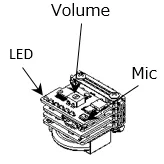
Leaf to use
Use the following leaves.
| Type | Name | Q’ty |
|---|---|---|
| AI03 | MIC&VR&LED | 1 |
| AP01 | AVR MCU | 1 |
| AV01 | CR2032 | 1 |
| AZ01 | USB | 1 |
| AZ62 | Connector Cover | 1 |
| CR2032 coin cell battery | 1 | |
| M2*15mm screw | 2 |
Assembly
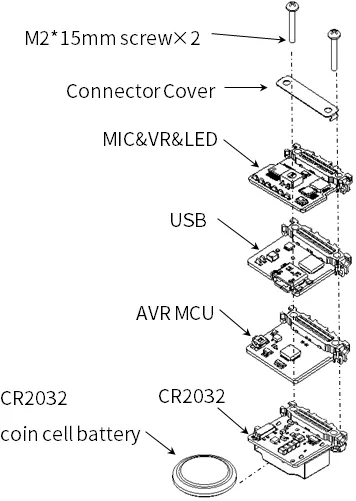
Let’s assemble leaves as shown in the figure below.
Source code
Write the following program in the Arduino IDE.
//=====================================================================
//  Sound level meter
//
//    (c) 2020 Trillion-Node Study Group
//    Released under the MIT license
//    https://opensource.org/licenses/MIT
//
//      Rev.00 2020/05/17  First release
//=====================================================================
#define LED1             6
#define LED2             7
#define LED3             8
#define LED4             9
#define LED5            10
#define LED6            11

#define MIC             16      // A2
#define VR              17      // A3

unsigned int dataVR;
unsigned int dataMic;

//-----------------------------------------------
// Get VR and MIC data
//-----------------------------------------------
void getSensorData()
{
    dataVR = analogRead(VR);
    dataMic = analogRead(MIC);

    Serial.println("---------------------");
    Serial.print("MIC  = ");
    Serial.println(dataMic,DEC);
    Serial.print("VR   = ");
    Serial.println(dataVR,DEC);
}

//-----------------------------------------------
// Turn the LEDs on and off according to the VR and MIC values.
//-----------------------------------------------
void dispSensorData()
{
    if (dataVR < 400)
    {
      digitalWrite(LED4,LOW);
      digitalWrite(LED5,LOW);
      digitalWrite(LED6,LOW);
    }
    else if (dataVR >= 400 && dataVR < 800)
    {
       digitalWrite(LED4,LOW);
       digitalWrite(LED5,LOW);
       digitalWrite(LED6,HIGH);
    }
    else if (dataVR >= 800 && dataVR < 900)
    {
       digitalWrite(LED4,LOW);
       digitalWrite(LED5,HIGH);
       digitalWrite(LED6,HIGH);
    }
    else
    {
       digitalWrite(LED4,HIGH);
       digitalWrite(LED5,HIGH);
       digitalWrite(LED6,HIGH);
    }

    if (dataMic < 700)
    {
      digitalWrite(LED1,LOW);
      digitalWrite(LED2,LOW);
      digitalWrite(LED3,LOW);
    }
    else if (dataMic >= 700 && dataMic < 800)
    {
      digitalWrite(LED1,LOW);
      digitalWrite(LED2,LOW);
      digitalWrite(LED3,HIGH);
    }
    else if (dataMic >= 800 && dataMic < 850)
    {
      digitalWrite(LED1,LOW);
      digitalWrite(LED2,HIGH);
      digitalWrite(LED3,HIGH);
    }
    else
    {
      digitalWrite(LED1,HIGH);
      digitalWrite(LED2,HIGH);
      digitalWrite(LED3,HIGH);
    }
}


void setup() {
  Serial.begin(115200);
  Serial.println("start!!");

   pinMode(LED1, OUTPUT);
  digitalWrite(LED1, LOW);
  pinMode(LED2, OUTPUT);
  digitalWrite(LED2, LOW);
  pinMode(LED3, OUTPUT);
  digitalWrite(LED3, LOW);
  pinMode(LED4, OUTPUT);
  digitalWrite(LED4, LOW);
  pinMode(LED5, OUTPUT);
  digitalWrite(LED5, LOW);
  pinMode(LED6, OUTPUT);
  digitalWrite(LED6, LOW);

  pinMode(MIC, INPUT);
  pinMode(VR, INPUT);

  //起動テスト(LED)
  digitalWrite(LED1,HIGH);
  delay(200);
  digitalWrite(LED2,HIGH);
  delay(200);
  digitalWrite(LED3,HIGH);
  delay(200);
  digitalWrite(LED4,HIGH);
  delay(200);
  digitalWrite(LED5,HIGH);
  delay(200);
  digitalWrite(LED6,HIGH);
  delay(200);
  digitalWrite(LED1,LOW);
  digitalWrite(LED2,LOW);
  digitalWrite(LED3,LOW);
  digitalWrite(LED4,LOW);
  digitalWrite(LED5,LOW);
  digitalWrite(LED6,LOW);
  delay(200);
}


void loop() {
  getSensorData();
  dispSensorData();
  delay(100);
}Execution Results
As you rotate the volume, the number of LEDs will light up according to the amount of rotation. The number of LEDs will light up according to the ambient volume, depending on the microphone.