
STM32: Display text on an LCD
Explore with your favorite AI
 ChatGPT
  Claude
 Gemini & other AI
Copy this page’s context into your AI to explore how it works and what you can build.
 Open Gemini
 Copy the prompt, then paste it into Gemini’s message box.
View prompt
Overview
Section titled “Overview”With an LCD (liquid crystal display) leaf, you can easily display strings on the screen.
It also comes with two button switches and can be used as a controller.
Leaf to use
Section titled “Leaf to use”| Type | Name | Q’ty |
|---|---|---|
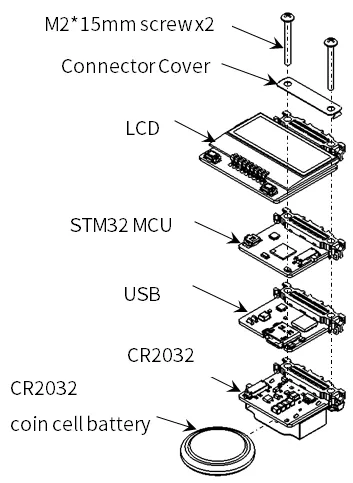
| AZ62 | Connector Cover | 1 |
| AI04 | LCD | 1 |
| AP03 | STM32 MCU | 1 |
| AZ01 | USB | 1 |
| AV01 | CR2032 | 1 |
| CR2032 coin cell battery | 1 | |
| M2*15mm screw | 2 |
Assembly
Section titled “Assembly”Let’s assemble leaves as shown in the figure below.
Source code
Section titled “Source code”Write the following program in the Arduino IDE. The Basic Kit differs from the Basic Kit only in the specification of the pins. In order to use MIC&VR&LED Leaf, you need to install the library. If you haven’t installed it yet, refer to Environment to install it.
//=====================================================================//  Leafony Platform sample sketch//     Application  : LCD SW test//     Processor    : STM32L452RE (Nucleo-64/Nucleo L452RE)////     Leaf configuration//       (1) AI04 LCD//       (2) AP03 STM32 MCU//       (3) AZ01 USB////    (c) 2020  Trillion-Node Study Group//    Released under the MIT license//    https://opensource.org/licenses/MIT////      Rev.00 2021/01/26  First release//=====================================================================// use libraries//  ST7032 - Arduino LiquidCrystal compatible library//    https://github.com/tomozh/arduino_ST7032//=====================================================================
//---------------------------------------------------------------------// difinition//---------------------------------------------------------------------#include <Wire.h>                   // I2C#include <ST7032.h>                 // LCD
//-----------------------------------------------// IO pin name definition// Define it according to the leaf to be connected.//-----------------------------------------------#define SW1         PC7             // D2  (INT0)
//-----------------------------------------------// Define constants to be used in the program//-----------------------------------------------#define I2C_EXPANDER_ADDR   0x1A
//---------------------------------------------------------------------// object//---------------------------------------------------------------------//------------------------------// LCD//------------------------------ST7032 lcd;
//====================================================================// setup//====================================================================void setup(){  pinMode(SW1, INPUT);                                //LCD SW1  Wire.begin();
  // IO Expander Initialize  i2c_write_byte(I2C_EXPANDER_ADDR, 0x03, 0xFE);  i2c_write_byte(I2C_EXPANDER_ADDR, 0x01, 0x01);      // LCD Power on
  //LCD Initialize  lcd.begin(8, 2);                                    // 8 characters, 2 lines  lcd.setContrast(30);  lcd.clear();
  lcd.print(" Hello!");  lcd.setCursor(0, 1);  delay(3000);
  i2c_write_byte(I2C_EXPANDER_ADDR, 0x01, 0x00);      // LCD Power off  delay(3000);
  i2c_write_byte(I2C_EXPANDER_ADDR, 0x01, 0x01);      // LCD Power on
  // LCD Initialize  lcd.begin(8, 2);                                    // 8 characters, 2 lines  lcd.setContrast(30);  lcd.clear();
  lcd.print("12345678");  lcd.setCursor(0, 1);  lcd.print("87654321");  delay(3000);
  lcd.clear();
  lcd.blink();  int i;  for (i=0 ; i<8 ;i++){     lcd.setCursor(i, 0);      delay(1000);  }  for (i=0 ; i<8 ;i++){     lcd.setCursor(i, 1);      delay(1000);  }  lcd.noBlink();}
//====================================================================// Main loop//====================================================================void loop(){  char val;
  // SW 1  val = digitalRead(SW1);  lcd.setCursor(0, 0);  if (val == 1) {     lcd.print("SW1 is H");  }else{     lcd.print("SW1 is L");  }
  // SW 2  val = i2c_read_byte(I2C_EXPANDER_ADDR, 0x00);  lcd.setCursor(0, 1);  if ((val & 0x02) == 0x02)  {     lcd.print("SW2 is H");  }  else {    lcd.print("SW2 is L");  }  delay(1000);}
//=====================================================================// I2C control function//=====================================================================//-----------------------------------------------// I2C Write 1 byte to the slave device//-----------------------------------------------void i2c_write_byte(int device_address, int reg_address, int write_data){  Wire.beginTransmission(device_address);  Wire.write(reg_address);  Wire.write(write_data);  Wire.endTransmission();}
//-----------------------------------------------// I2C Read 1 byte from the slave device//-----------------------------------------------unsigned char i2c_read_byte(int device_address, int reg_address){
  int read_data = 0;
  Wire.beginTransmission(device_address);  Wire.write(reg_address);  Wire.endTransmission(false);
  Wire.requestFrom(device_address, 1);  read_data = Wire.read();
return read_data;}Execution Results
Section titled “Execution Results”On the LCD the screens are displayed in the following order
- The “Hello” string
- Moving the cursor
- Button input status display