
Web Bluetooth IoT with STM32
Use this page with AI
Explore with your favorite AI
 ChatGPT
  Claude
 Gemini & other AI
Copy this page’s context into your AI to explore how it works and what you can build.
 Open Gemini
 Copy the prompt, then paste it into Gemini’s message box.
View prompt
Table of contents
This sample is an STM32 implementation of the one introduced in the Basic Kit Web Bluetooth IoT. The Web Bluetooth application uses the same one as the Basic Kit. For more details, please refer to Web Bluetooth IoT in Basic Kit.
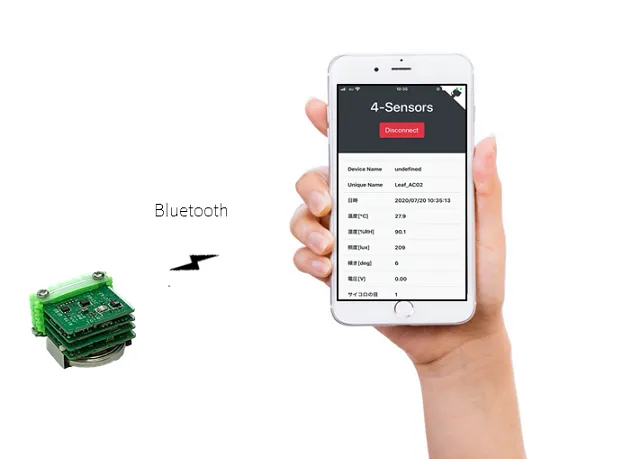
Company and product names mentioned on this website are trademarks or registered trademarks of their respective owners.
What to prepare
- STM32 MCU, BLE Sugar, 4-Sensors, CR2032, USB
- Windows1, Mac2, or Linux3 PC (for development)
- Android4, iPhone5, iPad5 smartphone or tablet
- Google Chrome (version 70.0.3526.0 or later)
- Arduino IDE, STM32CubeProgrammer software V2.4.0
Sample app source code
Please download both in advance.
Leafony Configuration
In this sample, you can try the following leaf configurations.
| Type | Name | Q’ty |
|---|---|---|
| AZ62 | Connector Cover | 1 |
| AI01 | 4-Sensors | 1 |
| AZ01 | USB | 1 |
| AP03 | STM32 MCU | 1 |
| AC02 | BLE Sugar | 1 |
| AV01 | CR2032 | 1 |
| - | CR2032 coin cell battery | 1 |
| - | M2*18mm screw | 2 |
Assembly
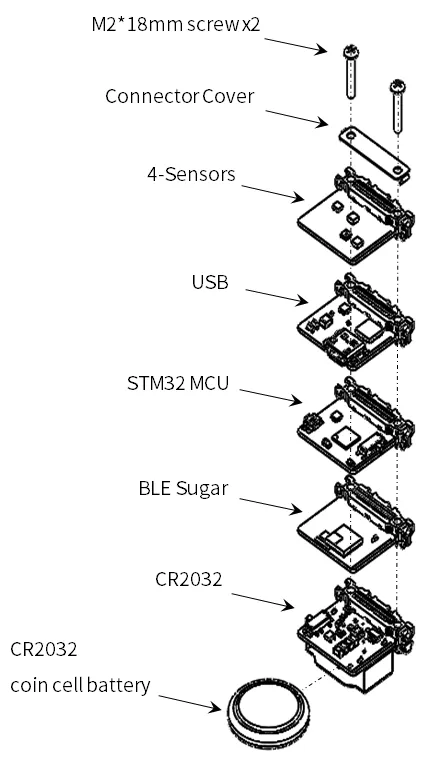
Assemble the leaves as shown in the figure below.
Pin assignment
Refer to the figure below for the pin assignment of each leaf.

Execution method
- Upload STM32_4-Sensors_BLE.ino using Arduino IDE.
- Open the downloaded
index.htmlof Web Bluetooth App with Google Chrome.
For details on how to use the web app, refer to Basic Kit Getting Started Guide.