How to connect the debugger
Use this page with AI
Set up with your favorite AI
 ChatGPT
  Claude
 Gemini & other AI
Copy the setup prompt into your AI. Work through each step together, from checking your kit to getting it running.
 Open Gemini
 Copy the prompt, then paste it into Gemini’s message box.
View prompt
Table of contents
Overview
The STM32 MCU leaf (AP03 / STM32L452REI6) can be debugged using STMicroelectronics’ STM32CubeIDE and an STLINK-V3SET or ST-LINK/V2 debugger. Debugging with these debuggers is not available when using the Arduino IDE. This page explains how to connect to these debuggers.
What to prepare
- STM32 MCU, Shield, Screw
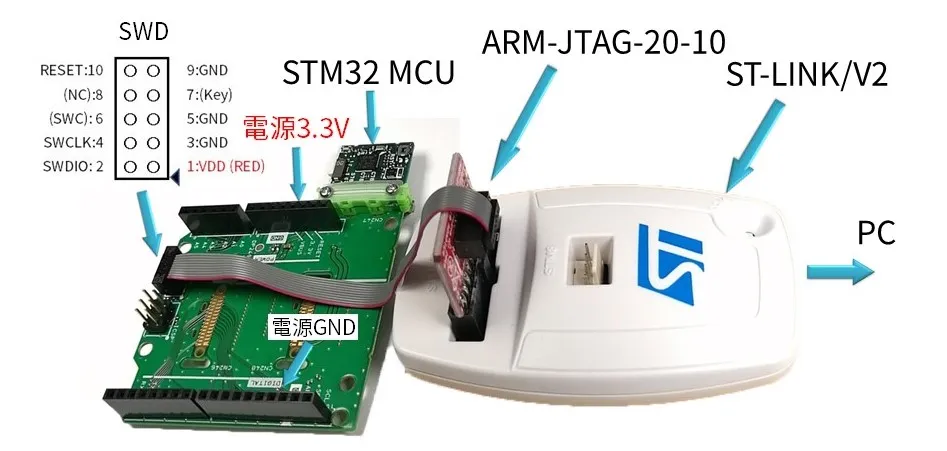
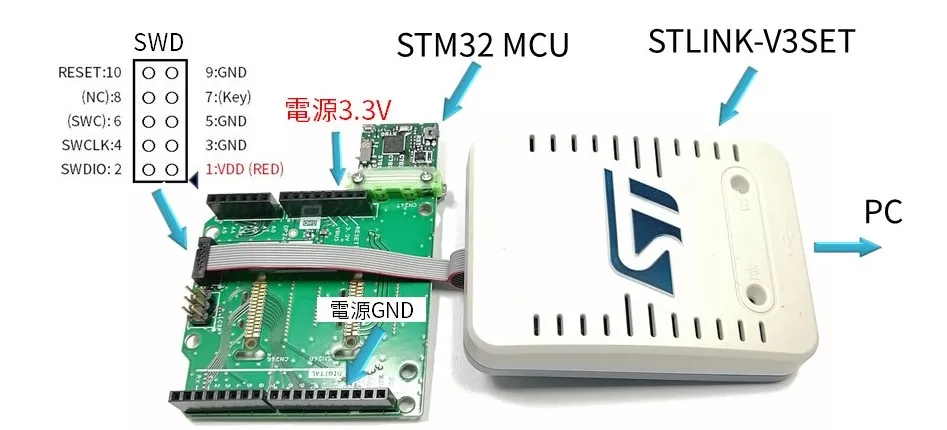
- STLINK-V3SET (Japanese) / ST-LINK/V2 (Japanese)+ ARM-JTAG-20-10
- USB cable
- PC (Windows)
Connection method
A 1.27mm pitch SWD connector (FTSH-105-01-L-D) is mounted on the Shield leaf, so you can attach an STM32 MCU leaf and connect it to the debugger.
In the case of STLINK-V3SET
In the case of ST-LINK/V2 + ARM-JTAG-20-10