micro SD
Use this page with AI
Explore with your favorite AI
 ChatGPT
  Claude
 Gemini & other AI
Copy this page’s context into your AI to explore how it works and what you can build.
 Open Gemini
 Copy the prompt, then paste it into Gemini’s message box.
View prompt
Table of contents
Overview
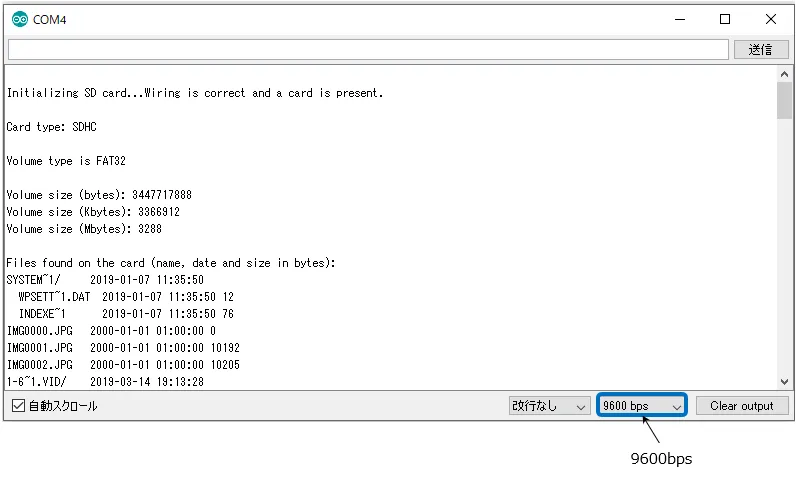
The information on the microSD card will be displayed on the serial monitor of the PC.
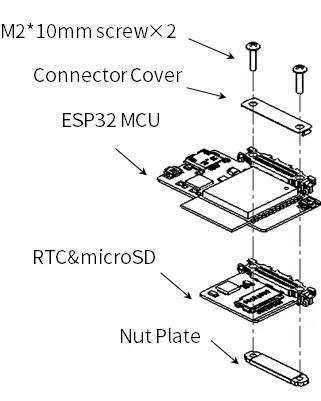
Leaf to use
| Type | Name | Q’ty |
|---|---|---|
| AZ62 | Connector Cover | 1 |
| AP02 | ESP32 MCU | 1 |
| AZ02 | RTCµSD | 1 |
| AZ63 | Nut Plate | 1 |
| M2*15mm screw | 2 |
Assembly
Source code
- In the Arduino IDE, go to
File->Sketch Examples->SD(esp32)->SD_Testand write it to the microcontroller board.
/*
 * Connect the SD card to the following pins:
 *
 * SD Card | ESP32
 *    D2       -
 *    D3       SS
 *    CMD      MOSI
 *    VSS      GND
 *    VDD      3.3V
 *    CLK      SCK
 *    VSS      GND
 *    D0       MISO
 *    D1       -
 */
#include "FS.h"
#include "SD.h"
#include "SPI.h"

void listDir(fs::FS &fs, const char * dirname, uint8_t levels){
    Serial.printf("Listing directory: %s\n", dirname);

    File root = fs.open(dirname);
    if(!root){
        Serial.println("Failed to open directory");
        return;
    }
    if(!root.isDirectory()){
        Serial.println("Not a directory");
        return;
    }

    File file = root.openNextFile();
    while(file){
        if(file.isDirectory()){
            Serial.print("  DIR : ");
            Serial.println(file.name());
            if(levels){
                listDir(fs, file.name(), levels -1);
            }
        } else {
            Serial.print("  FILE: ");
            Serial.print(file.name());
            Serial.print("  SIZE: ");
            Serial.println(file.size());
        }
        file = root.openNextFile();
    }
}

void createDir(fs::FS &fs, const char * path){
    Serial.printf("Creating Dir: %s\n", path);
    if(fs.mkdir(path)){
        Serial.println("Dir created");
    } else {
        Serial.println("mkdir failed");
    }
}

void removeDir(fs::FS &fs, const char * path){
    Serial.printf("Removing Dir: %s\n", path);
    if(fs.rmdir(path)){
        Serial.println("Dir removed");
    } else {
        Serial.println("rmdir failed");
    }
}

void readFile(fs::FS &fs, const char * path){
    Serial.printf("Reading file: %s\n", path);

    File file = fs.open(path);
    if(!file){
        Serial.println("Failed to open file for reading");
        return;
    }

    Serial.print("Read from file: ");
    while(file.available()){
        Serial.write(file.read());
    }
    file.close();
}

void writeFile(fs::FS &fs, const char * path, const char * message){
    Serial.printf("Writing file: %s\n", path);

    File file = fs.open(path, FILE_WRITE);
    if(!file){
        Serial.println("Failed to open file for writing");
        return;
    }
    if(file.print(message)){
        Serial.println("File written");
    } else {
        Serial.println("Write failed");
    }
    file.close();
}

void appendFile(fs::FS &fs, const char * path, const char * message){
    Serial.printf("Appending to file: %s\n", path);

    File file = fs.open(path, FILE_APPEND);
    if(!file){
        Serial.println("Failed to open file for appending");
        return;
    }
    if(file.print(message)){
        Serial.println("Message appended");
    } else {
        Serial.println("Append failed");
    }
    file.close();
}

void renameFile(fs::FS &fs, const char * path1, const char * path2){
    Serial.printf("Renaming file %s to %s\n", path1, path2);
    if (fs.rename(path1, path2)) {
        Serial.println("File renamed");
    } else {
        Serial.println("Rename failed");
    }
}

void deleteFile(fs::FS &fs, const char * path){
    Serial.printf("Deleting file: %s\n", path);
    if(fs.remove(path)){
        Serial.println("File deleted");
    } else {
        Serial.println("Delete failed");
    }
}

void testFileIO(fs::FS &fs, const char * path){
    File file = fs.open(path);
    static uint8_t buf[512];
    size_t len = 0;
    uint32_t start = millis();
    uint32_t end = start;
    if(file){
        len = file.size();
        size_t flen = len;
        start = millis();
        while(len){
            size_t toRead = len;
            if(toRead > 512){
                toRead = 512;
            }
            file.read(buf, toRead);
            len -= toRead;
        }
        end = millis() - start;
        Serial.printf("%u bytes read for %u ms\n", flen, end);
        file.close();
    } else {
        Serial.println("Failed to open file for reading");
    }


    file = fs.open(path, FILE_WRITE);
    if(!file){
        Serial.println("Failed to open file for writing");
        return;
    }

    size_t i;
    start = millis();
    for(i=0; i<2048; i++){
        file.write(buf, 512);
    }
    end = millis() - start;
    Serial.printf("%u bytes written for %u ms\n", 2048 * 512, end);
    file.close();
}

void setup(){
    Serial.begin(115200);
    if(!SD.begin()){
        Serial.println("Card Mount Failed");
        return;
    }
    uint8_t cardType = SD.cardType();

    if(cardType == CARD_NONE){
        Serial.println("No SD card attached");
        return;
    }

    Serial.print("SD Card Type: ");
    if(cardType == CARD_MMC){
        Serial.println("MMC");
    } else if(cardType == CARD_SD){
        Serial.println("SDSC");
    } else if(cardType == CARD_SDHC){
        Serial.println("SDHC");
    } else {
        Serial.println("UNKNOWN");
    }

    uint64_t cardSize = SD.cardSize() / (1024 * 1024);
    Serial.printf("SD Card Size: %lluMB\n", cardSize);

    listDir(SD, "/", 0);
    createDir(SD, "/mydir");
    listDir(SD, "/", 0);
    removeDir(SD, "/mydir");
    listDir(SD, "/", 2);
    writeFile(SD, "/hello.txt", "Hello ");
    appendFile(SD, "/hello.txt", "World!\n");
    readFile(SD, "/hello.txt");
    deleteFile(SD, "/foo.txt");
    renameFile(SD, "/hello.txt", "/foo.txt");
    readFile(SD, "/foo.txt");
    testFileIO(SD, "/test.txt");
    Serial.printf("Total space: %lluMB\n", SD.totalBytes() / (1024 * 1024));
    Serial.printf("Used space: %lluMB\n", SD.usedBytes() / (1024 * 1024));
}

void loop(){

}
Execution Results
The information on the microSD card will be displayed on the serial monitor of the PC.