
AVR: Play sound through a speaker
Explore with your favorite AI
 ChatGPT
  Claude
 Gemini & other AI
Copy this page’s context into your AI to explore how it works and what you can build.
 Open Gemini
 Copy the prompt, then paste it into Gemini’s message box.
View prompt
Overview
Section titled “Overview”Use the piezoelectric loudspeaker in the SP&PIR Leaf to make the melody sound.
Leaf to use
Section titled “Leaf to use”Use the following leaves.
| Type | Name | Q’ty |
|---|---|---|
| AI02 | SP&PIR | 1 |
| AP01 | AVR MCU | 1 |
| AV01 | CR2032 | 1 |
| AZ01 | USB | 1 |
| AZ62 | Connector Cover | 1 |
| CR2032 coin cell battery | 1 | |
| M2*15mm screw | 2 |
Assembly
Section titled “Assembly”Let’s assemble leaves as shown in the figure below.
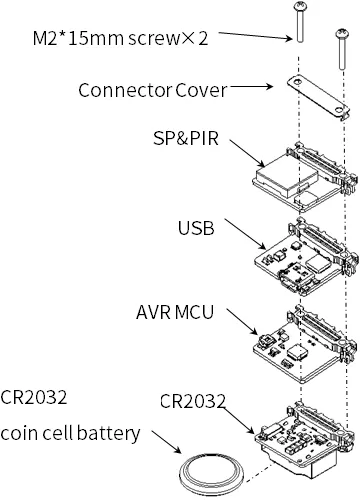
Source code
Section titled “Source code”Open the Arduino, go to File → Sketch Examples → 02.Digital → toneMelody.
In this sample code, the speaker is supposed to be connected to pin number 8.
But as the loudspeaker is connected to pin 5 in Leafony, you should fix the following part to make it correct.
- Change the
8to5in line 37.
tone(5, melody[thisNote], noteDuration);- Change
8to5in line 44.
noTone(5);Execution Results
Section titled “Execution Results”The melody sounds only once from the speakers.