LoRa (AVR)
Explore with your favorite AI
 ChatGPT
  Claude
 Gemini & other AI
Copy this page’s context into your AI to explore how it works and what you can build.
 Open Gemini
 Copy the prompt, then paste it into Gemini’s message box.
View prompt
Overview
Section titled “Overview”Using LoRa Easy leaf, sensor data (temperature, humidity, illumination, tilt) can be sent to a distant location and output to a PC terminal.
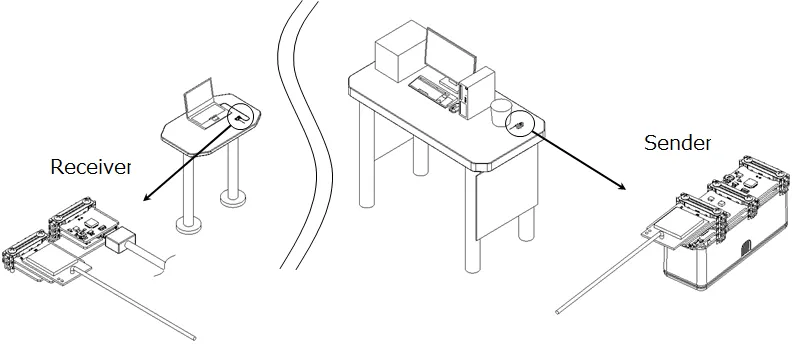
If there is a discrepancy between the temperature (or humidity) you want to display and the temperature (or humidity) of the 4-Sensors, perform the correction between the two points. For details, see here.
Demo Video
Section titled “Demo Video”Leaf to use
Section titled “Leaf to use”Use the following leaves.
Sending side leaf
Section titled “Sending side leaf”| Type | Name | Q’ty |
|---|---|---|
| AC03 | LoRa Easy | 1 |
| AX04 | Spacer | 1 |
| AI01 | 4-Sensors | 1 |
| AP01 | AVR MCU | 1 |
| AV03 | CR2032 | 1 |
| AZ01 | USB | 1 |
| AZ61 | Connector | 2 |
| AZ62 | Connector Cover | 3 |
| AZ63 | Nut Plate | 2 |
| AA battery | 1 | |
| M2*25mm screw | 6 |
Receiving side leaf
Section titled “Receiving side leaf”| Type | Name | Q’ty |
|---|---|---|
| AC03 | LoRa Easy | 1 |
| AP01 | AVR MCU | 1 |
| AX03 | Leaf x2 | 1 |
| AZ01 | USB | 1 |
| AZ62 | Connector Cover | 2 |
| AZ63 | Nut Plate | 2 |
| M2*15mm screw | 4 |
Assembly
Section titled “Assembly”Assemble the leaves as shown in the figure below.
Sending side
Section titled “Sending side”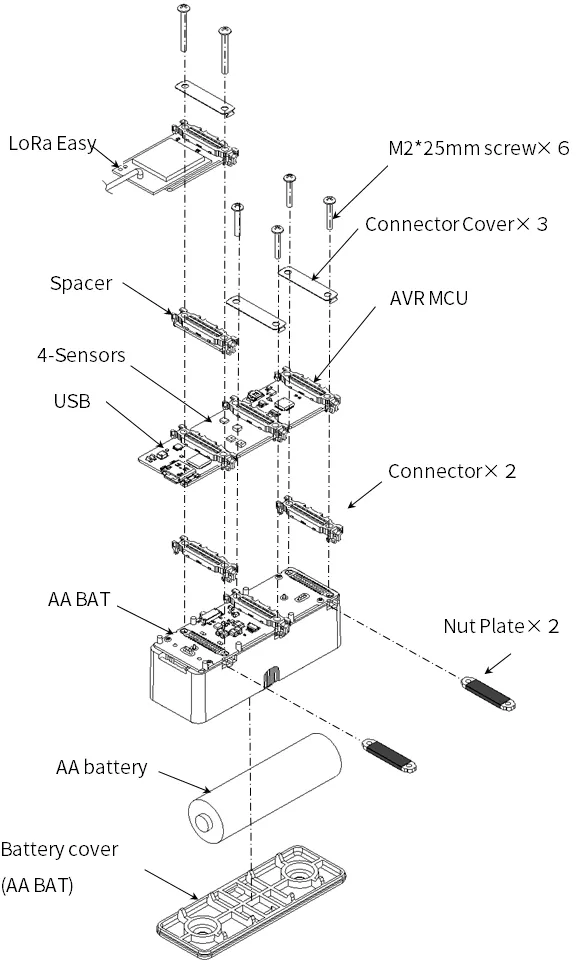
Receiving side
Section titled “Receiving side”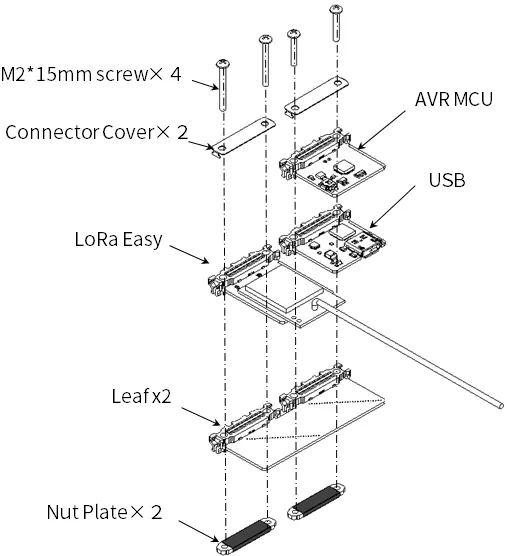
Source code
Section titled “Source code”- 4-Sensors and AVR MCU library (timer interrupt) are required for writing. Please include the library beforehand. For details, see here.
- In the Arduino IDE, write the following program.
- Sending side 4-Sensors_LoRa_Tx.ino
- Receiving side LoRa_Rx_Serial_monitor.ino
Execution result
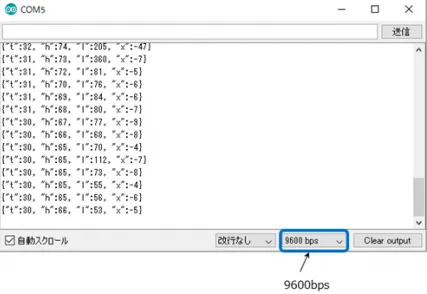
Section titled “Execution result”Open the serial monitor in the Arduino IDE and set the baud rate to 9600 bps to display the sensor data (temperature, humidity, illumination, and tilt).