IoT services using Google Sheets (ESP32 Setup)
Explore with your favorite AI
 ChatGPT
  Claude
 Gemini & other AI
Copy this page’s context into your AI to explore how it works and what you can build.
 Open Gemini
 Copy the prompt, then paste it into Gemini’s message box.
View prompt
ESP32 configuration
Section titled “ESP32 configuration”Assemble the leaves, write a sketch, and make sure the data is written to Google Sheets.
Leaf to use
Section titled “Leaf to use”Use the following leaves.
| Type | Name | Q’ty |
|---|---|---|
| AZ62 | Connector Cover | 2 |
| AI01 | 4-Sensors | 1 |
| AX07 | Back to back | 1 |
| AP02 | ESP32 MCU | 1 |
| AV04 | 2V~4.5V | 1 |
| AZ63 | Nut Plate | 2 |
| AAA battery holder | 1 | |
| AAA battery | 3 | |
| M2*8mm screw | 2 | |
| M2*12mm screw | 2 | |
| φ10x2mm magnet | 1 |
Assembly
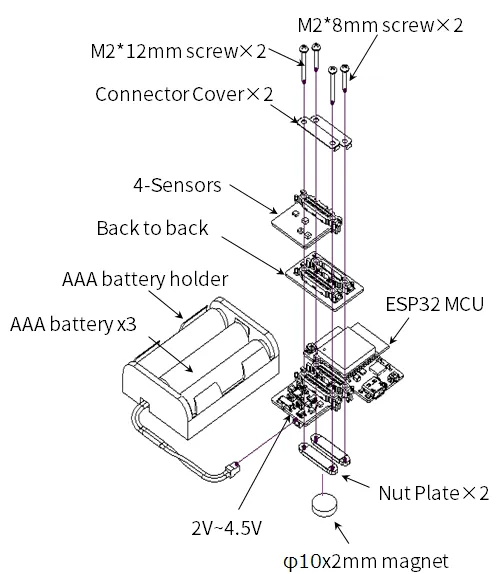
Section titled “Assembly”Stack the ESP32 MCU leaf and the 4-Sensors leaf on top of each other and screw them together as shown below.
Source code
Section titled “Source code”Write the program in the Arduino IDE.
Note the following bullets in the Github source code, modify it, and write it to ESP32 leaf.
- Substitute the following constants for the information of the
WiFito be accessed.
const char* SSID = "wifi_ssid"; // WiFi SSIDconst char* PASSWORD = "wifi_password"; // WiFi Password- Substitute the following constants for the web app information you just created.
- From the app-specific URL:const char* KEY =
AKfycbxbxoqWzuN8Eztplnhf3ywC-0QpWc8utkIY1QLngj4fHJFRvZKh
- From the app-specific URL:const char* KEY =
const char* KEY = "google_scripts_key";- If you want to adjust the time interval for writing sensor data, substitute the following constants.
- Units are in seconds.
uint64_t DEEP_SLEEP_TIME_SEC = 60;#include <Arduino.h>#include <Wire.h>#include <HTTPClient.h>#include <HTS221.h>#include <ClosedCube_OPT3001.h>
// Unique IDString UniqueID = "Leafony_AP02";
// Connecting WiFi Settingsconst char* SSID = "wifi_ssid"; // WiFi SSIDconst char* PASSWORD = "wifi_password"; // WiFi Password// Accessed Google Script Settingsconst char* APP_SERVER = "script.google.com";const char* KEY = "google_scripts_key";
// Device sleep time (sec) to reduce Joule heatuint64_t DEEP_SLEEP_TIME_SEC = 60;
// 省略Execution result
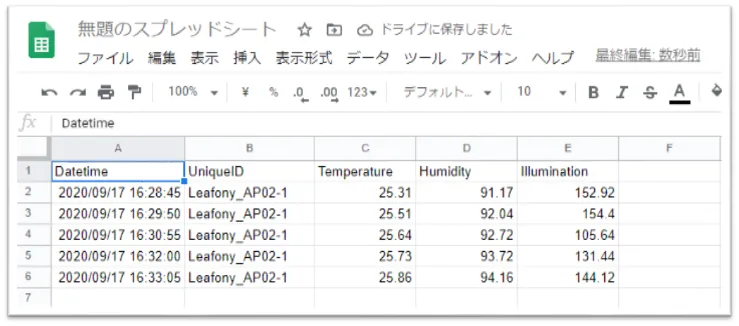
Section titled “Execution result”Run Arduino and sequential sensor data will be written to Google Sheets.